Data Transformations
When dealing with raw data, it’s often not exactly the way you want it. You might need to scale channels or apply time offsets.
Data Transformations scale and shift a plotted series: multiply its values, or move it up, down, left or right. Use them to convert units, remove an offset or align two recordings in time.
Overview
Transformations are non-destructive. They are applied as the series is drawn, so the underlying data is never changed and you can reset them at any time.
Formula: new value = (original value * multiplier / divisor) + offset
Multiplying and dividing happen first, then the offset is added. Dividing by zero is treated as dividing by one, so it never breaks the plot.
Transformation Controls
Right-click a series in the legend:
- Rename - click it, type the new name, and press Enter
- Add Confidence Band - shade a tolerance band around the series (lines only, see Plotting & Navigation)
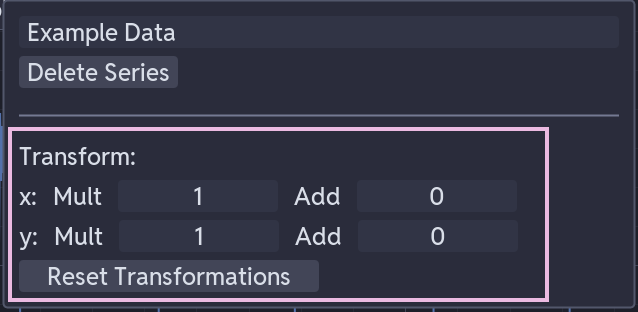
- Transform x / Transform y - Multiply, Divide and Add sliders for each axis
- Link files - while enabled, an X transform you make here is applied to every other series from the same file
- Reset Transformations - returns every slider to its default (multiply and divide at 1.0, add at 0.0)
- Change Series Type - switches the series between line and scatter
- Move to Primary/Secondary Y-Axis - moves the series to the other Y-axis
- Move Line Up / Move Line Down - reorders the series in the legend
- Delete - removes the series from the subplot
For the sliders themselves:
- Drag a slider to adjust the value and watch the plot update
- Click a slider to type an exact value
Transformation Types
Y Multiply / Y Divide (Scale)
- Default: 1.0
- Scales the amplitude. Used for unit conversion and for inverting a signal (multiply by -1).
Y Add (Offset)
- Default: 0.0
- Shifts the baseline. Used to remove a DC bias or apply a calibration offset.
X Multiply / X Divide (Time Scale)
- Default: 1.0
- Scales the time axis. Used to convert time units or to reverse the time direction.
X Add (Time Offset)
- Default: 0.0
- Shifts the time origin. Used to correct a time offset or align one signal with another.
Template Integration
Templates can carry their transformations with them. Apply a transformation, then save the template.
Templates support six operations: multiply_x, divide_x, add_x, multiply_y, divide_y and add_y. See Templating System.
Troubleshooting
Transformations Not Applying
- Check the values are not still at their defaults: multiply and divide at 1.0, add at 0.0
- Check the multiplier is not set to 0, which flattens the series onto the offset